we do your events
[actually, just the tech parts you hate]
4x faster at 1/4 the price
stop draining your brain and your wallet

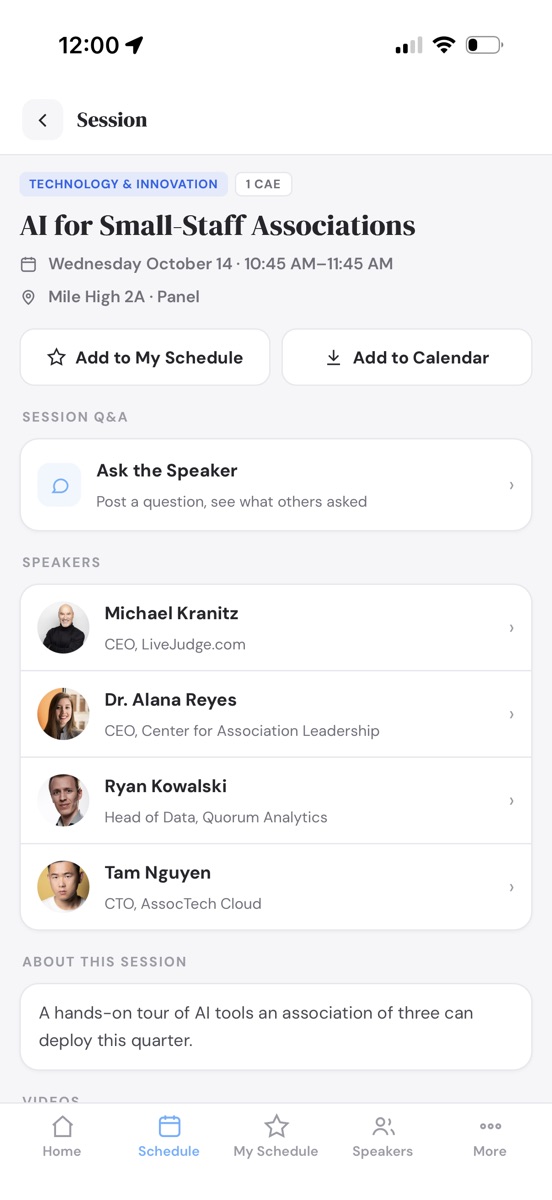
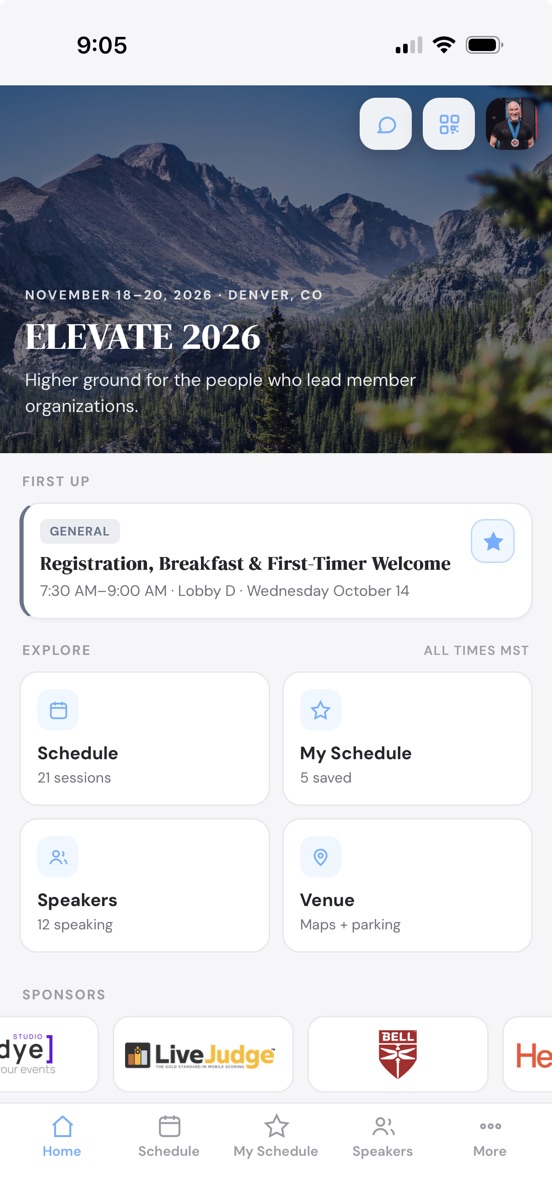
AI-enabled WDYE Studio builds your event's entire website and event app: agenda, speakers, sponsors, hotels, live Q&A, attendee messaging, QR contact scanning, paid registration and more. 4x faster. 1/4 the price.
full builder access. no credit card until you go live.
Everything You Need to Run Your Event
Built for Organizers, Not Webmasters
One studio runs the whole event: the public site, registration and payments, printed badges, the attendee app, the exhibit floor, and the people who make it happen.
A Site That Publishes Itself
Every section is a form you fill in - agenda, speakers, sponsors, venue, FAQ - and the live site on your own address updates the moment you save.
Registration & Payments
A real box office: registrant types, tickets, merchandise, coupons, early-bird windows and member-only rates checked against your roster, with cards settling straight into your own Stripe account.
Printed Badges & Check-In
Design a 4×3 badge once, preview it on real attendees, and print the whole room on Avery stock. QR tickets check people in at the door.
A No-Download Attendee App
Schedule, personal agendas, speakers, maps and announcements on every phone from a QR code - no app store, no install.
Exhibit Floor & Banquet Sales
Draw the hall to scale and booths sell themselves on a live map at registration. Lay out the banquet in tables and seats sell the same way, with exhibitor portals and worker passes included.
Speakers & Sponsors Serve Themselves
Invite links and open applications bring in headshots, bios, sessions and logos without retyping. You just approve.
Engagement On Site
Live polls, session Q&A and feedback, attendee networking with QR contact swaps, and push bulletins that reach the whole room in a minute.
AI Drafts the Busywork
Drop in a spreadsheet or describe your program: the agenda, the registration form, even the exhibit floor arrive as drafts you nudge into place.
Your Brand, Your Team, Your Rules
Fonts, palettes and hero styles, per-person permissions, private password-protected review, and attendee support tickets with your name on them.
The Event Website
Conference-Grade Power, Built Like a Document
A multi-day agenda with tracks, rooms and credits. Speaker and sponsor walls, venue and hotels, FAQ and search. Every one of them is a form you fill in, never a page you design, and the whole site restyles itself around your logo and your palette.

Drag-and-Drop Agenda
Build the program on a real calendar. Drag a session onto a day, drag its bottom edge to change how long it runs, and everything snaps to the quarter hour. Room and speaker double-bookings flag themselves in amber before anyone else sees them.
Sessions That Carry Everything
Tracks, rooms, credit types, speakers, tags, documents and videos ride on every session, and your visitors filter the whole program by any of them.
Speakers and Sponsors, Presented Properly
Keynote badges, headshot grids, bios and links, plus sponsor tiers with a logo for light backgrounds and one for dark. Both walls build themselves from the roster you already keep.
Keep Only the Sections You Need
Venue, hotels, sponsors, videos, documents, FAQ, and blocks of your own. Mark the rest not applicable and reorder the whole page by dragging.
Built to Be Found
Your own titles, descriptions and social cards, a sitemap that maintains itself, and a robots policy that keeps an unpublished site out of Google until you are ready.
Private Review, Then Live
Share a password-protected preview with your board or your client. Flip to Live only when every required section is complete, and the password gate disappears.


Included with every plan, starting at Website.Your site publishes to a branded URL the moment you flip it live. Change it at will.
Speakers & Sponsors
They Fill In Their Own Details
Send one link. Speakers write their own bios, crop their own headshots and propose their own sessions; sponsors submit their own logos, blurbs and booth numbers. You approve with a click and the site updates itself. Nobody gets an account for you to manage.
One Link, No Accounts
Invite by email and each person gets their own private link. Coming back later takes a two-word code emailed on request, so there is no password for them to lose or for you to reset.
Open Calls, On Your Terms
Turn on speaker applications, sponsor applications, or both, and anyone can propose a session or submit their company. Turn them off and the door closes without touching what already came in.
Headshots That Fit the Grid
They crop their own photo in the browser to the shape your site uses, so the speaker wall lines up without a designer ever opening it.
Approve, Decline, Reconsider
Submissions wait in your queue. Approve and they publish; decline and the record stays with a quiet "not selected" note, so nothing is lost and nobody is emailed by accident.
Sponsors Maintain Their Own Listing
Logos for light and dark backgrounds, website, blurb, booth number and a point of contact, all kept current by the sponsor, inside the tiers you define.
It Lands on the Site Instantly
An approved speaker appears on the speaker wall and on every session they are attached to, in the event app too, with nothing re-typed on your side.


Self-service editing and open applications come with every plan. Emailed intake invitations are part of Web/Mobile and above.
Call for Proposals
Abstract Management, From Submission to Decision
Open a call and every speaker application becomes a real proposal: an abstract, objectives, an outline and your own questions. Your committee scores them against your rubric, and the decisions go out together, in your words, with the accepted talks already on the agenda.
A Real Submission Form
Abstract, learning objectives, an outline, format and length, co-speakers, and any question you add. Speakers save drafts, revise when you ask for more, and sign in with a two-word emailed code, no password.
Your Rubric, Their Scores
Weighted criteria you write once. Reviewers score every proposal against them, and the rubric locks the moment the first review is drafted, so every score on the board means the same thing.
A Committee You Keep
Reviewers live in your account's pool and carry over to next year's event. Assign by category rule, by hand, or let the balancer spread the load. Blind mode hides who wrote what.
Decisions Held Until You Say
Accept, accept with changes, waitlist or decline in private. Release them all at once or on a schedule you set, each email in your own words, and correct one afterwards without re-sending the rest.
Accepted Talks Become Sessions
A proposal owns its session, so an accepted decision lands in the agenda bullpen with the title, description and speaker already in place. Nothing is retyped, and nothing is scheduled before its decision is released.
Reminders, an Outbox, and Exports
Deadline reminders go out on their own, every email passes through an outbox that retries, and proposals, reviews and the program export as CSV, Excel or JSON.
| Receipt | Title | Category | Coverage | Reviewers | Score |
|---|---|---|---|---|---|
| P-0007 | Board Governance That Doesn't Slow You Down | Leadership | 3 of 3 | D. Cole, M. Reyes, T. Nguyen | 86.4 |
| P-0012 | Winning Back Lapsed Members: A 90-Day Playbook | Membership | 3 of 3 | D. Cole, P. Patel, T. Nguyen | 81.0 |
| P-0015 | AI for Small-Staff Associations | Technology | 2 of 3 | M. Reyes, P. Patel | 77.5 |
| P-0019 | Your Newsletter Is Not a Strategy | Marketing | 3 of 3 | D. Cole, M. Reyes, P. Patel | 64.2 |
| P-0023 | Reserves, Investments & the Board Conversation | Finance | 0 of 3 | Unassigned | not yet |
Included with Web/Mobile and above; a trial gets a taste. With no call set up, speakers apply exactly as before.
The Attendee App
An Event App You Can Launch in Under Five Minutes
Your agenda, speakers, sponsors, and venue are already in the builder. Turning the app on reuses every one of them, so there is nothing to rebuild, nothing to submit to an app store, and nothing for your attendees to install.
Live Bulletins, Straight to the Lock Screen
Room change, weather delay, keynote running late. Post it once and it pushes to every attendee's phone, even with the app closed.
Speaker Q&A You Control
Attendees ask from their seat. Questions land in a private bullpen where your moderators publish the good ones and mark them answered, or you let them post straight through.
Attendees Message Each Other, Privately
An opt-in directory of who else is in the room, searchable by name, company or industry. Start a conversation and it lands on their phone as a notification. No mobile number and no email address changes hands to do it.
A Personal Agenda in One Tap
Star the sessions that matter to build My Schedule, then drop the whole thing into Apple or Google Calendar at once.
The Whole Program in Their Pocket
Multi-day agenda with tracks, rooms, and credits, plus speaker bios, venue maps, hotels, resources, and FAQ. It caches itself, so a packed ballroom with weak wifi still opens the schedule.
Your Icon on Their Home Screen
Choose the artwork, the backdrop color, and the label. Attendees scan a QR code and add it in two taps. No app store review, no download, no update to chase.
Sponsors Get Real Estate
Logos ride along on the app home screen and on their own page, which gives you inventory to sell that your last event did not have.
Included with Web/Mobile and above. The app publishes to your own address at yourevent.wdyehost.com/app and updates the moment you edit the site.
QR Contact Scanning
Every Badge Is a Business Card
100% opt-in lead scanning. Attendees create their own digital QR badges in seconds right in the event app. No lanyard printers, no lead-retrieval rental units.
Digital Badges, Zero Setup
Nobody is preloaded and there is no attendee-data upload, so there is nothing to opt anyone into. Each attendee creates their own card: name, company, industry, and a note that travels with every scan.
Scan to Swap
The in-app scanner reads a badge and saves the card on the spot. No app on the other phone? A plain camera scan of the badge opens the same flow.
A Lead List That Leaves With Them
Searchable all week, then out the door as CSV or Excel sorted by last name, or shared anywhere with the phone's own share sheet.
Call, Text, or Email in One Tap
Every saved card opens straight into the phone's dialer, messages, or mail. Follow up from the hallway, not from a spreadsheet next Tuesday.
Built for Terrible Conference Wi-Fi
Nothing to download and requests light enough to squeeze through a crawling venue network. The app itself caches, so screens stay up while the room's bandwidth dies.
Charge for It If You Like
Set an access code in the studio and registration requires it. Hand it to paid attendees, print it on a badge tier, or sell it at the booth.
 Saved Jordan Kim · Summit MediaAlex RiveraNorthline Group
Included with Web/Mobile and above, inside the same no-download app. Each attendee's list is their own; organizers never harvest it.
Live Session Polls
Ask the Room, Watch It Answer
Build a poll once, then run it on as many sessions as you like. Every session keeps its own ballot box, so the same question asked in two rooms creates two sets of results.
Create Once, Run It Anywhere
Write the question one time and attach it to any number of sessions. Each session collects its own votes, so Tuesday's room never blurs into Wednesday's, and you can compare the two.
Four Ways to Ask
One choice, pick-your-top-three, full rank order, or a 1 to 5 star rating. The right shape for "which topic wins" is not the right shape for "how did we do," so you get both.
Results the Second They Vote
The card flips to animated live results with their own pick tagged. Nobody sees the numbers before voting, and a per-poll switch can hide results from voters entirely, keeping the data yours alone.
One Ballot Per Phone
Each device gets one vote per poll, per session. Tap again and it simply shows the results, so a refresh never stuffs the box.
Open and Close From the Studio
Close voting when the speaker moves on. The poll stays on the session page showing final results, and you can reopen it anytime.
No Clickers to Rent
Polls live inside the same no-download event app as the agenda and Q&A. Requests are light enough for a packed ballroom on struggling wifi.
Included with Web/Mobile and above. Build the poll in the studio, assign it to sessions, and it is on every phone in the room.
Attendee Registration
Sell Every Seat From Your Own Site
The Full Suite adds a real box office to your event site: registrant types you define, a cart-style form your attendees already know how to use, card checkout, QR tickets and door check-in. No per-ticket platform fee, ever.
Registrant Types You Define
Attendee, VIP, member, press: each type carries its own price, its own items, and its own questions. Invite-only types hide behind single-use codes, a shared passcode, or a magic link you email out.
A Form That Sells Like a Store
Tickets, sessions straight from your agenda, merchandise with sizes and quantities, and categories you invent. A live order summary keeps the total honest while they pick.
Rules, Coupons & Early-Bird Prices
Reveal a question, show an item, or grant a discount based on an answer. Coupons cap their own uses, and prices can step up automatically on a date you set.
Cards Straight Into Your Stripe
Checkout charges the attendee's card directly into your own Stripe account. Your money never sits in ours, and you can pass the processing cost through at checkout.
QR Tickets & Door Check-In
Every registration emails a QR ticket. At the door, volunteers with a passcode check people in by name or camera scan on their own phones. No hardware to rent.
Bring the Whole Team on One Order
Register several people in a single checkout, each with their own answers and their own QR ticket, and set savings tiers that reward the third or the fifth person on the order.
Items That Ask Their Own Questions
Adding a shirt reveals the size question; adding a workshop asks who is attending it. Anyone who still owes an answer is flagged in the studio and marked in the export, so you find the blanks well before the room does.
Orders, Reports & Refunds
Watch orders land live, print the report library (rosters, item summaries, revenue), build custom CSV or Excel exports, and refund with a click when plans change.


Included with Full Suite. Payments settle in your own Stripe account, and a signed test link rehearses the whole flow before you go live.
Hotel Rooming
Room Blocks Booked During Registration
List the hotels on your site, then attach the room block your contract gives you. A stay is booked in the same checkout as the ticket, night by night against what is left, and the hotel gets a rooming list it can actually use.

Blocks by the Night
One block per room type, with the rooms your contract gives you for each night. Attendees only ever see what is left, and a night that sells out simply stops offering itself.
Booked in the Same Checkout
Add a hotel and the registration form gains a Hotel Room step: check-in, check-out and room type, chosen inside the block's dates and your minimum and maximum nights. The reservation prints on the receipt.
The Rate Is Yours to Show
Each block carries a nightly rate you can display or keep to yourself. Nothing is charged through WDYE for the room; the hotel bills as it always has.
Hotel Questions on the Form
Occupancy, special requirements, a roommate's name: Field Library questions placed on the hotel, asked only of the registrant types you offer it to, and usable in your rules like any other question.
Changes From Their Own Link
A registrant adjusts the stay from the same link that modifies the rest of their order, until your booking cutoff. After it, they read the message you wrote.
The Rooming List, Ready for the Hotel
Per hotel: block pickup night by night, then every guest with dates, room type and their answers. Printable from Attendee Reports, and as CSV or Excel.
Included with Full Suite as part of registration. Hotel listings on your site are on every plan.
Badges & Check-In
Design & Print Badges
Design One Badge, Print the Whole Room. Our simple, modern badge designer lets you create clean, professional-looking badges that you can print six-up on standard Avery stock.
A Designer, Not a Template
Name and company fields, your own text, images, color blocks and a QR code, dragged anywhere on the badge. Fonts, sizes, all-caps, layers and snap-to-grid included, horizontal or vertical.
Previewed on Real Attendees
The canvas shows your actual registrations, one by one, before anything prints. Long names reveal themselves on screen, not at the check-in table.
The QR That Works the Room
Every badge carries the attendee's own scannable code. One scan in the event app swaps contact cards, so the badge is a business card too.


Avery Stock, Six to a Sheet
Print everyone, one registrant type, or a hand-picked few onto standard letter badge sheets. No cutting, no mail merge, no design software.
Lined Up on Your Printer
A live preview of the sheet shows exactly where each badge lands, and two nudge controls dial in any printer's alignment once, remembered forever.
Check-In, at the Gate and at Every Room Door
Scan Tickets at the Door. Know Who Came to Every Session.
The check-in app your gate volunteers use works at a room door too, with the rule you set per session and a report when the day is over.
A QR Sheet Signs Volunteers In
Print one Volunteer QR from the Dashboard and post it where the team gathers. A scan opens the check-in app already signed in, no passcode to type. Change the passcode and every printed sheet stops working.
Three Rules Per Session
Anyone can attend; anyone who saved it to My Schedule and checks in at the door; or only people who registered for it in advance. The app decides at the scan, shows the volunteer why, and keeps Admit Anyway for the judgment calls.
A Spoken Code for Check-Out Credit
Each restricted session gets a five-digit attendance code. The speaker reads it aloud at the end and attendees enter it in the event app, or a volunteer scans them out.
Session Totals, and Who Came
One sheet with every session's registered, checked in, checked out and no shows, and a detail report naming each attendee with their time in and out. Printable, CSV, Excel.

Included with Full Suite, right beside registration - the roster you sold is the roster you print, and the roster you scan at the door.
Exhibitor & Booth Sales
Sell the Exhibit Floor Straight From the Map
Draw your hall once, in real feet, and the floor sells itself: exhibitors pick their booth on a live map while they register, pay in the same checkout, and get a portal to run their own listing and booth crew.


A Floor Plan, Not a Spreadsheet
Booths, aisles, the stage and the food court, all drawn to scale in feet. Stamp whole numbered rows in one drag, renumber a block at once, and trace over a photo of your venue's real floor plan.
AI Drafts the First Pass
Describe last year's layout in a sentence or two and a draft floor appears on the canvas, ready to nudge. Zones split a big hall into tabs so the map stays usable on a phone.
Premium Rows for Premium Buyers
Categories color the map and carry default price, size and worker passes. Limit who may buy a category and the wrong buyers never even see those booths.
Booths Sell Themselves at Registration
Switch a registrant type on and its form gains a live Choose Your Booth step. A tapped booth holds for 15 minutes while they pay, so two buyers never land on the same space.
Exhibitors Run Their Own Listing
Every booth sale emails a private portal link. The exhibitor writes their own blurb, uploads light and dark logos, and lands on your site's floor map and directory without you retyping a thing.
Worker Passes That Register Themselves
Each booth includes free crew passes. The exhibitor shares one code, workers register on it, extras charge automatically, and your check-in roster fills itself.
Included with Full Suite. Booth revenue checks out through the same registration cart, straight into your own Stripe account.
Banquet & Table Seating
Sell the Banquet One Seat at a Time
Lay the room out as tables, attach the map to the dinner ticket, and the banquet sells itself: whoever adds it to their registration is shown the room, taps a table and picks their seats. Sponsors name their guests later, you move people by dragging, and the door knows everyone's table.
A Room Made of Tables
Stamp a grid of round or rectangular tables in one drag, set each one's seat count and price per seat, and label the stage and dance floor as shapes. Seats draw as dots on the rim, so a half-sold eight-top reads from across the room. Or describe the layout in a sentence and a draft appears on the canvas.
The Dinner Opens the Room
Seating hangs off the item, not the ticket type. Add the awards banquet to a registration and a Choose Your Seats step appears; buy three seats and you owe three picks. There is no audience list to keep in sync, and nobody who skipped the dinner ever sees the map.
Two Taps to a Seat
The map picks the table and a strip beneath it picks the seats, so twelve ten-tops never become 120 tiny targets on a phone. Picks are held for 15 minutes while they finish, and the checkout checks every seat again before the card is charged.
Sold in Pairs, or by the Table
Give a category a minimum and a sponsor table sells in fours, or only whole, and a stray single can never split it. Each banquet in your event gets its own map, and a room drawn once duplicates for the next night with every seat open.
You bought 3 seats with Awards Dinner Ticket. Tap a table to see its seats, then tap the seats you want. Your picks are held for 15 minutes while you finish.
2 of 3 seats chosen Table 12 · 3, Table 12 · 4
Names Can Wait
A sponsor who buys a table in June names the guests in September, from the same link that modifies their order. Each name saves on its own and can be changed any time, and the studio always shows who is sitting where.
Move People, Not Spreadsheets
Drag a taken seat onto an empty one to move a guest, or onto another guest to swap the two. Assign a registrant to a seat from the studio without charging anyone, and the door roster shows the table beside every name at check-in.
Included with Full Suite. Seats check out in the same registration cart as tickets and booths, straight into your own Stripe account.
Membership Validation
Member Rates, Checked Against Your Roster
Import your membership list once, then point a registrant type at it. Members prove who they are with the email address, mobile number or member number your organization already holds on file. Everyone else keeps the public rate, and nobody has to be checked by hand.
Import the Roster, Map the Columns
Drop in a CSV or the export your membership system already produces. Your column headings are matched to ours automatically, you correct anything guessed wrong, and a preview counts exactly what will change before one row is written.
Three Ways to Prove Membership
Match on email address, mobile number, or member number. Member numbers ask for a last name as well, so a sequential run of numbers can never be used to fish names and addresses out of your roster.
A Refresh, Never a Wipe
Import next quarter's file and members are updated, new ones added, and anyone the file no longer carries is marked lapsed. Nothing is deleted, so last year's registration still points at a real person.
Member Price and Public Price, Side by Side
One registrant type sits behind the list at the member rate, one open type carries the public rate. That is the whole two-price business case, with no coupon to leak and no honor system to police.
Expired Reads Differently From Not Found
A lapsed membership is told it has run out and who to call about renewing. A miss is told we could not find that address, in your words if you prefer. Two different problems never get the same unhelpful message.
The Form Asks, the Checkout Enforces
The roster is checked again when the card is charged, so passing the gate is not a way around it. One membership registers once per event, and the order keeps a permanent link to the member it matched.
4,812 active · 22 lapsed · in use by Top Design 2026 - Member Rate
| Name | Member Number | Expires | Status | |
|---|---|---|---|---|
| Dana WhitfieldNorthline Chapter | NAHA-10442 | [email protected] | 2026-12-31 | Active |
| Priya RamanMeridian Care | NAHA-10517 | [email protected] | 2027-03-31 | Active |
| Marcus BellBellworks | NAHA-09884 | [email protected] | 2026-06-30 | Expired |
| Tom OkaforOkafor Group | NAHA-11230 | [email protected] | No expiry | Active |
| Renee SalasSunridge Association | NAHA-08761 | [email protected] | 2025-09-30 | Lapsed |
Member Rate is open to members. Enter the email address your organization has on file to continue, or pick another registrant type above.
Email address [email protected] ContinueIncluded with Full Suite. Rosters are shared across your whole account alongside the item and question libraries, so a list imported for one event gates every event you run after it.
How It Works
Three Steps to a Live Event Site and App
No kickoff call, no scoping document, no agency queue. You start on step one the minute you sign up, and nothing you build expires while you decide.
Build
Fill in the sections that matter, choose your event's own address (yourevent.wdyehost.com) right inside the builder, and invite speakers & sponsors to submit their own details.
Review
Preview the real site as you work. Share a password-protected link with your board, your client, or your committee for sign-off.
Go Live
When required sections are complete, one click publishes to the world. This is the only moment we ask for payment.
Pricing
Try Everything Free. Pay When You Publish.
Every plan includes the full builder, private review links, and hosting with SSL on your wdyehost.com address. Event credits never expire, and multi-event packs save more.
Taste the full power of the system all the way to preview. When you are ready to go live, upgrade to your favorite plan.
- Full builder, every section
- Try intake, team logins & the AI Assistant
- Rehearse registration with test orders
- Password-protected review site
- A sample event to start from
- Unlimited private previews
- Your address reserved from day one
- Nothing expires while you decide
- No credit card required
- Going live requires a plan
One event site, live to the world for its full run, on your own address with SSL. Packages of 3, 5 or 10 are discounted.
- The complete website, published
- Agenda, speakers, sponsors, hotels
- Unlimited speakers, sessions & sponsors
- Site layout, SEO & social sharing
- Attendee question form & support inbox
- Your subdomain + SSL included
- Up to 10 team logins
- Email support
Everything in Website, plus the no-download attendee app: bulletins, speaker Q&A, live polls, private attendee messaging and QR contact scanning. Packages of 3, 5 or 10 are discounted.
- No-Download Event App
- Live bulletins with push notifications
- Speaker Q&A with moderators
- Live polling by session
- Session feedback & ratings
- Attendee directory & messaging
- QR Contact Scanning
- Speaker & sponsor intake portal
- AI Agenda Assistant
Everything in Web/Mobile, plus full attendee registration: booths, tickets, sessions and add-ons, coupons, invite codes, check-in and reports, with payments straight to your own Stripe.
- Everything in Web/Mobile
- Attendee registration & checkout
- Sell tickets, sessions & add-ons
- Exhibitor booth registration
- Banquet & table seating
- Rules, coupons & invite codes
- Member lists & member-only rates
- Group registration & savings tiers
- Payments straight to your Stripe
- QR tickets & door check-in
- Orders, reports & refunds
Compare packaging and features
Payments handled securely by Stripe. Event credits are spent when a site goes live and never expire.
Questions
Fair Asks
What happens when my trial event is ready to launch?
Nothing expires and nothing is deleted. Your site stays in private review until you buy an event credit (Website, Web/Mobile, or Full Suite). Then the Go Live button unlocks and your site is public within seconds.
Do I need my own hosting or domain?
No. Every site gets a fast, SSL-secured address like yourevent.wdyehost.com the moment you create it. Hosting is included in every plan.
Can my team help without breaking things?
Yes. Invite a teammate on your free trial to see how it works, then invite your whole team on any paid plan: every paid event gets up to 10 logins. Grant access section by section, so a volunteer can edit the FAQ without ever touching your branding or your launch controls.
How do speakers and sponsors get involved?
Send personal invite links or turn on open applications. They submit their own photos, bios, and materials through a guided portal, and nothing appears on your site until you approve it. Try it free on your trial; unlock unlimited invites with Web/Mobile or above.
Can I sell tickets and take payments?
Yes. The Full Suite adds attendee registration to your site: define registrant types, sell tickets, agenda sessions, merchandise and add-ons, and take cards at checkout. Payments land directly in your own Stripe account with no per-ticket platform fee, and every registration emails a QR ticket that works with the built-in door check-in. Build it all and place test orders free before you upgrade.
Can I charge members less than the public?
Yes, and without an honor system. Import your membership roster once, point one registrant type at it, and leave a second type open at the public rate. Members prove themselves with the email address, mobile number or member number you hold on file, the roster is checked again at checkout, and one membership registers once per event. The list lives on your account, so every event you run afterward can use it.
Can attendees pick their own banquet seats?
Yes. Draw the room as tables, attach the map to the dinner ticket, and anyone who buys that item is shown the room and picks their seats at checkout, with each pick held while they pay. A sponsor can buy a whole table and name the guests later, you can move people by dragging a seat, and the door roster shows the table beside every name.
What's an event credit?
One credit takes one event live for its entire run. Buy them singly or in discounted 3-, 5-, and 10-packs; they sit on your account and never expire.